

Redux 源码解析
11 月 04, 2021 • ☕️☕️☕️ 80 min read
本文将由浅到深介绍 redux 及其辅助工具的使用及其原理,想写这篇文章很久了,今天终于抽出时间来记录一下,小伙伴们准备好了吗,发车!
1、redux 的基本的使用
先用官网的例子来介绍下 redux 的最基本的使用(使用在原生 js 中)
注: 在阅读时,请先摒弃之前的使用习惯,不要去思考 react-redux,dva,saga 等用法,过度纠结辅助工具的语法只会让你对 redux 源码更加纠结,所以请先抛弃之前的使用语法,我们就从最原始的 redux 语法开始讲起。搭配 代码 食用更佳
//    ./src/index.jsx
import { createStore } from 'redux'
// 创建reducer
function counter(state = 0, action) {
  switch (action.type) {
    case 'INCREMENT':
      return state + 1
    case 'DECREMENT':
      return state - 1
    default:
      return state
  }
}
// 传入创建的reducer并创建store
const store = createStore(counter)
// 手动订阅更新 (当dispatch时将会执行回调函数)
store.subscribe(() =>
  // getState() 用来获取最新的state
  console.log(store.getState())
)
/**
 * 派发action,每次派发action都会在reducer中进行匹配,然后返回对应的state
 * 在上面我们已经手动订阅了更新,所以每次派发action时,都会触发store.subscribe回调函数,然后将最新的state打印出来
 */
store.dispatch({ type: 'INCREMENT' })
store.dispatch({ type: 'INCREMENT' })
store.dispatch({ type: 'INCREMENT' })
短短几行代码就可以实现 redux 的基本功能,那上面的例子中都用到了哪几个 api 呢,有创建 store 的 createStore,和挂载在 store 上的订阅 subscribe,派发 action 的 dispatch,获取最新状态的 getState,那我们就先看下这几个是怎么实现的(可以直接在 node_module 中找到 redux 源码文件中的 es 文件夹下 redux.js 去 debugger)
那我们就先看看 createStore 到底有什么玄机,由于 createStore 源码较长,我把他拆成几部分一点一点看
我们可以看到 createStore 接收三个参数,我们上面的例子只传入了第一个参数 reducer。第二个参数是 preloadedState 是初始化状态,第三个参数是 enhancer,这个的作用是用来增强 dispatch 的能力
export default function createStore(reducer, preloadedState, enhancer) {
  // 一些类型判断。。。
  if (
    (typeof preloadedState === 'function' && typeof enhancer === 'function') ||
    (typeof enhancer === 'function' && typeof arguments[3] === 'function')
  ) {
    throw new Error(
      'It looks like you are passing several store enhancers to ' +
        'createStore(). This is not supported. Instead, compose them ' +
        'together to a single function.'
    )
  }
  /**
   * 如果第二个参数传入的是一个函数,并且没有传入第三个参数,则把第二个参数赋值给第三个参数
   * 正是因为这样我们才可以这样写 createStore(reducer, applymiddleware(thunk)),直接省略
   * 第二个参数preloadedState
   */
  if (typeof preloadedState === 'function' && typeof enhancer === 'undefined') {
    enhancer = preloadedState
    preloadedState = undefined
  }
  // 一些类型判断
  if (typeof enhancer !== 'undefined') {
    if (typeof enhancer !== 'function') {
      throw new Error('Expected the enhancer to be a function.')
    }
    // 接受中间件来增强dispatch的能力,在讲中间件的部分我们重点讲,现在可以先忽略
    return enhancer(createStore)(reducer, preloadedState)
  }
  if (typeof reducer !== 'function') {
    throw new Error('Expected the reducer to be a function.')
  }

  let currentReducer = reducer // 传入的reducer
  let currentState = preloadedState // 传入的preloadedState,通常为undefined
  let currentListeners = [] // 创建一个用来存放subscribe的数组,因为可以声明多个subscribe, 所以使用一个数组来维护
  let nextListeners = currentListeners // 最新的存放订阅的数组
  let isDispatching = false // 一个标志,用来判断是否是派发阶段,在同一时间里,只能触发一次action,如果同一时间触发了两个actoin,那数据就会紊乱,所以通过这个锁来控制同一时间只能触发一次action
  /**
     * 用来确保nextListeners和currentListeners不是一个引用
     * 用来保证在订阅中添加订阅情况时能正常运行(可以自己在redux中把这里注释掉,然后看下有什么变化 :),所以通过nextListeners和currentListeners共同维护订阅数组
      store.subscribe(() => {
        // getState() 用来获取最新的state
        console.log(store.getState())
        store.subscribe(() => {
          // getState() 用来获取最新的state
          console.log(store.getState(), '2')
        });
      });
    */
  function ensureCanMutateNextListeners() {
    if (nextListeners === currentListeners) {
      nextListeners = currentListeners.slice()
    }
  }
  /**
   * getState用来返回最新的状态,在上述的例子中我们正是在订阅的回调中调用了这个方法来打印最新的状态
   * console.log(store.getState())
   * 那返回的这个currentState是什么时候改变呢,在后面的dispatch里我们会讲到
   */
  function getState() {
    if (isDispatching) {
      throw new Error(
        'You may not call store.getState() while the reducer is executing. ' +
          'The reducer has already received the state as an argument. ' +
          'Pass it down from the top reducer instead of reading it from the store.'
      )
    }
    return currentState
  }
}
紧接上文,下面介绍 createStore 中的 subscribe 是怎么实现的
// 可以看到这个subscribe这个方法只接受一个参数,我们上面的的例子传入了一个回调函数来打印最新的状态
// 再回忆下我们当时怎么使用的
// store.subscribe(() =>
//   console.log(store.getState())
// );
function subscribe(listener) {
  // 只允许接受函数
  if (typeof listener !== 'function') {
    throw new Error('Expected the listener to be a function.')
  }
  // 在reducer执行过程中不能执行订阅
  if (isDispatching) {
    throw new Error(
      'You may not call store.subscribe() while the reducer is executing. ' +
        'If you would like to be notified after the store has been updated, subscribe from a ' +
        'component and invoke store.getState() in the callback to access the latest state. ' +
        'See https://redux.js.org/api-reference/store#subscribelistener for more details.'
    )
  }
  let isSubscribed = true

  // 用来确保nextListeners和currentListeners不是一个引用
  ensureCanMutateNextListeners()
  /**
   * 将我们传入的回调函数push到nextListeners这个数组里,这样后续我们dispatch的时候就可以在这个数组里遍历
   * 找到我们的回调函数,然后执行它
   */
  nextListeners.push(listener)
  // 返回一个用来卸载订阅的函数
  // 这样就可以卸载订阅
  // store.subscribe(() =>
  //   console.log(store.getState())
  // )();
  return function unsubscribe() {
    if (!isSubscribed) {
      return
    }
    if (isDispatching) {
      throw new Error(
        'You may not unsubscribe from a store listener while the reducer is executing. ' +
          'See https://redux.js.org/api-reference/store#subscribelistener for more details.'
      )
    }
    isSubscribed = false
    ensureCanMutateNextListeners()
    const index = nextListeners.indexOf(listener)
    nextListeners.splice(index, 1)
    currentListeners = null
  }
}
紧接上文我们介绍下 dispatch 是如何实现派发 action 的
/**
 * 回忆下我们当时是怎么使用的
 * store.dispatch({ type: "INCREMENT" })
 * dispatch只接受一个参数actino,其中规范约定是一个包含type的对象
 */
function dispatch(action) {
  if (!isPlainObject(action)) {
    throw new Error('Actions must be plain objects. ' + 'Use custom middleware for async actions.')
  }
  /**
      function isPlainObject(obj) {
        if (typeof obj !== 'object' || obj === null) return false
        let proto = obj
        while (Object.getPrototypeOf(proto) !== null) {
          proto = Object.getPrototypeOf(proto)
        }
        return Object.getPrototypeOf(obj) === proto
      }
      * 该函数的作用是用来判断传入的acion是不是一个简单对象
      * 简单对象:new Object 或者 {} 声明的对象
      * isPlainObject({}) // true
      * class Per {}
      * var p = new Per()
      * isPlainObject(p) // false
    */
  // 判断是否有type来约束派发的acion必须包含type属性
  if (typeof action.type === 'undefined') {
    throw new Error(
      'Actions may not have an undefined "type" property. ' + 'Have you misspelled a constant?'
    )
  }
  if (isDispatching) {
    throw new Error('Reducers may not dispatch actions.')
  }
  try {
    isDispatching = true
    currentState = currentReducer(currentState, action)
  } finally {
    isDispatching = false
  }
  /**
     * 上面这里就是精髓了
     * currentReducer就是我们创建store时传入的reducer
     * @params currentState就是当前的状态,第一次是我们的默认参数state = 0,后续都是返回的最新的状态
     * @params action = { type: "INCREMENT" }
     * 然后返回新的state给currentState
     * 还记不记得getState()这个函数,getState()这个函数的返回值正是currentState
     * 所以实现了每次派发一个action改变了state,然后通过getState()就能拿到最新的state
     * 例子中我们传入的reducer:
      function counter(state = 0, action) {
        switch (action.type) {
          case "INCREMENT":
            return state + 1;
          case "DECREMENT":
            return state - 1;
          default:
            return state;
        }
      }
    */
  const listeners = (currentListeners = nextListeners)
  for (let i = 0; i < listeners.length; i++) {
    const listener = listeners[i]
    listener()
  }
  /**
     * 为什么每当我们执行store.dispatch({ type: "INCREMENT" }),subscribe订阅的回调函数都会自动执行呢
     * 正是因为在subscribe这个函数里我们将要订阅的回调函数push到了nextListeners这个数组里
     * 然后在这里我们就可以遍历nextListeners这个数组来执行我们订阅的回调函数
      store.subscribe(() =>
        console.log(store.getState())
      );
      store.dispatch({ type: "INCREMENT" })
    */
  return action
}
以上就是 createStore 的核心部分,createStore 里最后还有两个不常用的函数,这里贴出来大体解释下
// 通过条件判断之后,以达到替换reducer效果
function replaceReducer(nextReducer) {
  if (typeof nextReducer !== 'function') {
    throw new Error('Expected the nextReducer to be a function.')
  }
  currentReducer = nextReducer
  // This action has a similiar effect to ActionTypes.INIT.
  // Any reducers that existed in both the new and old rootReducer
  // will receive the previous state. This effectively populates
  // the new state tree with any relevant data from the old one.
  dispatch({ type: ActionTypes.REPLACE })
}
// 这个函数是用来给开发者使用的,我们无法使用而且不需要掌握
function observable() {
  const outerSubscribe = subscribe
  return {
    /**
     * The minimal observable subscription method.
     * @param {Object} observer Any object that can be used as an observer.
     * The observer object should have a `next` method.
     * @returns {subscription} An object with an `unsubscribe` method that can
     * be used to unsubscribe the observable from the store, and prevent further
     * emission of values from the observable.
     */
    subscribe(observer) {
      if (typeof observer !== 'object' || observer === null) {
        throw new TypeError('Expected the observer to be an object.')
      }
      function observeState() {
        if (observer.next) {
          observer.next(getState())
        }
      }
      observeState()
      const unsubscribe = outerSubscribe(observeState)
      return { unsubscribe }
    },
    [$$observable]() {
      return this
    },
  }
}
在 createStore 的结尾将这些方法暴露出来,这样我们就可以通过 store.xxx 来调用了
// 这里redux默认派发了一个action用来初始化stateTree,ActionTypes.INIT这个其实就是一个随机的字符,用来触发reducer里的switch里的default的回调,返回初始化的状态,这次的dispatch不会触发订阅,因为订阅在store创建之后
dispatch({ type: ActionTypes.INIT })
return {
  dispatch,
  subscribe,
  getState,
  replaceReducer,
  [$$observable]: observable,
}
2、combineReducers 的使用及解析
以上就是最基础的 redux 使用及其源码,但是在我们的使用中,通常都是维护一个状态树,然后通过多个 reducer 来改变状态树,redux 提供了 combineReducers 这个 api 来帮助我们维护多个 reducer,先让我们看下基本的 combineReducers 的使用
//   ./src/index2.jsx   提示:将webpack入口改为index2.jsx即可运行
import { createStore, combineReducers } from 'redux'
// 创建多个reducer
function counter(state = 0, action) {
  switch (action.type) {
    case 'INCREMENT':
      return state + 1
    case 'DECREMENT':
      return state - 1
    default:
      return state
  }
}
function counter2(state = 0, action) {
  switch (action.type) {
    case 'INCREMENT2':
      return state + 1
    case 'DECREMENT2':
      return state - 1
    default:
      return state
  }
}
// 这里我们可以看到combineReducers方法接受一个对象为参数,对象的value正是每一个reducer
const rootReducer = combineReducers({
  counter,
  counter2,
})
// 传入创建的reducer并创建store
const store = createStore(rootReducer)
// 手动订阅更新 (当dispatch action 将会执行回调函数)
store.subscribe(() =>
  // getState() 用来获取最新的state
  console.log(store.getState())
)
/**
 * 派发action,每次派发action都会在reducer中进行匹配,然后返回对应的state
 * 在上面我们已经手动订阅了更新,所以每次派发action时,都会触发store.subscribe回调函数,然后将最新的state打印出来
 */
store.dispatch({ type: 'INCREMENT' })
store.dispatch({ type: 'INCREMENT' })
store.dispatch({ type: 'INCREMENT' })
store.dispatch({ type: 'INCREMENT2' })
store.dispatch({ type: 'INCREMENT2' })
store.dispatch({ type: 'INCREMENT2' })
// 输出的结果
// {counter: 1, counter2: 0}
// {counter: 2, counter2: 0}
// {counter: 3, counter2: 0}
// {counter: 3, counter2: 1}
// {counter: 3, counter2: 2}
// {counter: 3, counter2: 3}
上述的例子我们可以看到,createStore 这个方法接收的是合并的 rootReducer 为参数,并且 store.getState()返回的 state 变为了对象的形式{counter: 1, counter2: 0},那 combineReducers 究竟做了什么,让我们来一探究竟!
// 参数reducers 为我们传入的 {counter: function counter, counter2: function counter2}
function combineReducers(reducers) {
  // Object.keys方法返回对象的所有可枚举属性的数组
  // reducerKeys = [counter, counter2]
  const reducerKeys = Object.keys(reducers)
  const finalReducers = {}
  for (let i = 0; i < reducerKeys.length; i++) {
    const key = reducerKeys[i]
    // 如果在开发环境,会有一个报错提示
    if (process.env.NODE_ENV !== 'production') {
      if (typeof reducers[key] === 'undefined') {
        warning(`No reducer provided for key "${key}"`)
      }
    }

    /**
     * 这里其实就是一个筛选的过程,如果我们传入的reducers参数是这种格式
     * {
     *    counter: function counter
     *    counter2: function counter2
     *    counter3: undefined
     * }
     * 那么将会把counter3过滤掉,返回的finalReducers为
     *
     * {
     *    counter: function counter
     *    counter2: function counter2
     * }
     */
    if (typeof reducers[key] === 'function') {
      finalReducers[key] = reducers[key]
    }
  }

  const finalReducerKeys = Object.keys(finalReducers)
  /**
   *  得到最终的finalReducerKeys和finalReducers
   *  finalReducerKeys = ['counter', 'counter2']
   *  finalReducers = {
   *    counter: funtion counter,
   *    counter2: funtion counter2
   *  }
   */
  let unexpectedKeyCache
  if (process.env.NODE_ENV !== 'production') {
    unexpectedKeyCache = {}
  }
  // 这里是做一个类型判断,这个函数的解析在下方,可以先移步下方assertReducerShape的解析
  let shapeAssertionError
  try {
    assertReducerShape(finalReducers)
  } catch (e) {
    shapeAssertionError = e
  }
  /**
     * 精髓来了,combineReducers在经历了一系列的判断后,最终会返回一个函数combination
      const rootReducer = combineReducers({
        counter,
        counter2
      })
      const store = createStore(rootReducer);
     * 然后我们再将这个函数传入createStore
     * 大家还记得createStore接受的第一个参数吗,在没有使用combineReducers之前传入的是单个的reducer
     * 在使用了之后传入的是combination
     * 再回忆一下createStore中的dispatch函数,其中最主要的是下面这段
     * try {
        isDispatching = true
        currentState = currentReducer(currentState, action)
      } finally {
        isDispatching = false
      }
     * 现在的currentReducer正是combination
    */
  return function combination(state = {}, action) {
    // 结合上文的shapeAssertionError, 如果assertReducerShape里抛出了异常,那么在这里也会被阻塞
    if (shapeAssertionError) {
      throw shapeAssertionError
    }
    // 如果不是在生产环境下,做一些警告级别的错误
    if (process.env.NODE_ENV !== 'production') {
      // 这个函数的解析也在下方,可以先移步下方的getUnexpectedStateShapeWarningMessage解析
      const warningMessage = getUnexpectedStateShapeWarningMessage(
        state, // currentState
        finalReducers, // 多个reducer组成的对象
        action, // 传入的action
        unexpectedKeyCache
      )
      if (warningMessage) {
        warning(warningMessage)
      }
    }

    // 经过了一系列的判断以后,终于来到了精髓部分
    let hasChanged = false
    // 这个nextState就是最终返回值
    const nextState = {}
    // finalReducerKeys = ['counter', 'counter2']
    for (let i = 0; i < finalReducerKeys.length; i++) {
      // 为了方便大家理解,我们以i=0时刻为例,看一下每一个字段对应着什么
      const key = finalReducerKeys[i] // 'counter'
      const reducer = finalReducers[key] // function counter
      const previousStateForKey = state[key] // state就是currentState
      // 执行function counter,并且将最新的state赋值给nextStateForKey
      const nextStateForKey = reducer(previousStateForKey, action)
      // 做一次类型判断
      if (typeof nextStateForKey === 'undefined') {
        // getUndefinedStateErrorMessage就是返回一段错误文案
        const errorMessage = getUndefinedStateErrorMessage(key, action)
        throw new Error(errorMessage)
      }
      // 将counter这次返回的最新的state赋值到nextState这个对象里,所以我们最后拿到的是{conuter: 1, counter: 2} 这种格式
      nextState[key] = nextStateForKey
      // hasChanged的作用是用来判断最新的状态与上一次的状态有没有发生改变,如果发生改变则为true
      // 并且这里有一个短路操作,只要多个reducer其中有一个状态发生了改变,则hasChanged为true
      hasChanged = hasChanged || nextStateForKey !== previousStateForKey
    }
    // 如果所有的reducer都没有改变状态,则返回原来的状态,否则返回最新的状态
    // 这里就有疑问了,为什么要做这个判断,无论有没有发生改变直接返回最新的状态不就可以了吗
    // 个人理解这里之所以要做这个判断,是因为在状态没有改变的情况,还是返回之前的引用,就不必再开辟新的引用来存储
    // 新的状态,只有状态发生改变,才去返回最新的引用
    hasChanged = hasChanged || finalReducerKeys.length !== Object.keys(state).length
    return hasChanged ? nextState : state
  }
}
assertReducerShape 解析,主要作用是保证你的 reducer 都是正常可运行的
// 入参reducers为
// {
//   counter: funtion counter,
//   counter2: funtion counter2
// }
function assertReducerShape(reducers) {
  Object.keys(reducers).forEach((key) => {
    const reducer = reducers[key]
    // 这一步相当于redux手动派发了一次action,ActionTypes.INIT在上文讲过,就是是一个随机的字符串,用来触发reducer里switch判断的defalut
    // default:
    //   return state;
    // 如果在reducer函数里没有写defalut,或者在default里没有返回state, 那么将会抛出下面的异常
    const initialState = reducer(undefined, { type: ActionTypes.INIT })
    if (typeof initialState === 'undefined') {
      throw new Error(
        `Reducer "${key}" returned undefined during initialization. ` +
          `If the state passed to the reducer is undefined, you must ` +
          `explicitly return the initial state. The initial state may ` +
          `not be undefined. If you don't want to set a value for this reducer, ` +
          `you can use null instead of undefined.`
      )
    }
    // 这里是确保不能占用redux内部特有的命名空间 redux/*
    if (
      typeof reducer(undefined, {
        type: ActionTypes.PROBE_UNKNOWN_ACTION(),
      }) === 'undefined'
    ) {
      throw new Error(
        `Reducer "${key}" returned undefined when probed with a random type. ` +
          `Don't try to handle ${ActionTypes.INIT} or other actions in "redux/*" ` +
          `namespace. They are considered private. Instead, you must return the ` +
          `current state for any unknown actions, unless it is undefined, ` +
          `in which case you must return the initial state, regardless of the ` +
          `action type. The initial state may not be undefined, but can be null.`
      )
    }
  })
}
getUnexpectedStateShapeWarningMessage 解析,主要是一些警告错误,判断 reducers 是否为空,inputState 是否是简单对象等
/**
 * @params inputState 也就是currentState
 * @params reducers 也就是finalReducers
 * @params action
 */
function getUnexpectedStateShapeWarningMessage(inputState, reducers, action, unexpectedKeyCache) {
  // 国际惯例,还是先取出多个reducers属性组成的数组 reducerKeys = ['counter', 'counter2']
  const reducerKeys = Object.keys(reducers)
  const argumentName =
    // 这块其实就是根据action.type来确定报错时候的文案
    action && action.type === ActionTypes.INIT
      ? 'preloadedState argument passed to createStore'
      : 'previous state received by the reducer'
  // 至少要有一个reducer
  if (reducerKeys.length === 0) {
    return (
      'Store does not have a valid reducer. Make sure the argument passed ' +
      'to combineReducers is an object whose values are reducers.'
    )
  }
  // 这个地方判断第一个参数inputState是不是一个简单对象
  // 这个时候机智的小伙伴就已经发现,我们对currentState的判断已经变成了一个简单对象
  // 回忆一下,store.getState()返回的数据格式 {counter: 3, counter2: 3}
  if (!isPlainObject(inputState)) {
    return (
      `The ${argumentName} has unexpected type of "` +
      {}.toString.call(inputState).match(/\s([a-z|A-Z]+)/)[1] +
      `". Expected argument to be an object with the following ` +
      `keys: "${reducerKeys.join('", "')}"`
    )
  }
  // 以下操作主要是用来确保有没有不合理的key
  const unexpectedKeys = Object.keys(inputState).filter(
    // reducers.hasOwnProperty(key)用来判断对象reducers里有没有属性key
    (key) => !reducers.hasOwnProperty(key) && !unexpectedKeyCache[key]
  )
  unexpectedKeys.forEach((key) => {
    unexpectedKeyCache[key] = true
  })
  if (action && action.type === ActionTypes.REPLACE) return
  if (unexpectedKeys.length > 0) {
    return (
      `Unexpected ${unexpectedKeys.length > 1 ? 'keys' : 'key'} ` +
      `"${unexpectedKeys.join('", "')}" found in ${argumentName}. ` +
      `Expected to find one of the known reducer keys instead: ` +
      `"${reducerKeys.join('", "')}". Unexpected keys will be ignored.`
    )
  }
}
3、combineReducers 进阶用法及其解析
在使用中我们通常会声明一个初始化对象,然后把这个对象传给不同的 reducer,由于声明的初始化对象是一个引用数据类型,在使用这我们就会发现一些问题,看下面的例子
//  ./src/index3.jsx
import { createStore, combineReducers } from 'redux'
const count = {
  num: 0,
}
const count2 = {
  num2: 0,
}
// 错误用法
const handleData = (state, type) => {
  state[type] += 1
  return state
}
function counter(state = count, action) {
  switch (action.type) {
    case 'INCREMENT':
      return handleData(state, 'num')
    default:
      return state
  }
}
function counter2(state = count2, action) {
  switch (action.type) {
    case 'INCREMENT2':
      return handleData(state, 'num2')
    default:
      return state
  }
}
const rootReducer = combineReducers({
  counter,
  counter2,
})
const store = createStore(rootReducer)
store.dispatch({ type: 'INCREMENT' })
const a = store.getState()
store.dispatch({ type: 'INCREMENT' })
const b = store.getState()
store.dispatch({ type: 'INCREMENT2' })
const c = store.getState()
store.dispatch({ type: 'INCREMENT2' })
const d = store.getState()
console.log(a, 'a')
console.log(b, 'b')
console.log(c, 'b')
console.log(d, 'd')
思考一下,最后的四个 console 打印结果是什么呢,我们期望的是依次打印出每次的 dispatch 修改后的 state,结果四次打印的都是{counter: {num: 2}, counter2: {num2: 2}},那怎样去实现期望的效果呢,第一种方法,对 state 做一层深拷贝,我们只需要改写一下 handleData 即可
const handleData = (state, type) => {
  state = Object.assign({}, state, {
    [type]: state[type] + 1,
  })
  return state
}
// 或者使用展开运算符
const handleData = (state, type) => {
  return { ...state, [type]: state[type] + 1 }
}
3.1、使用 immutable 对象
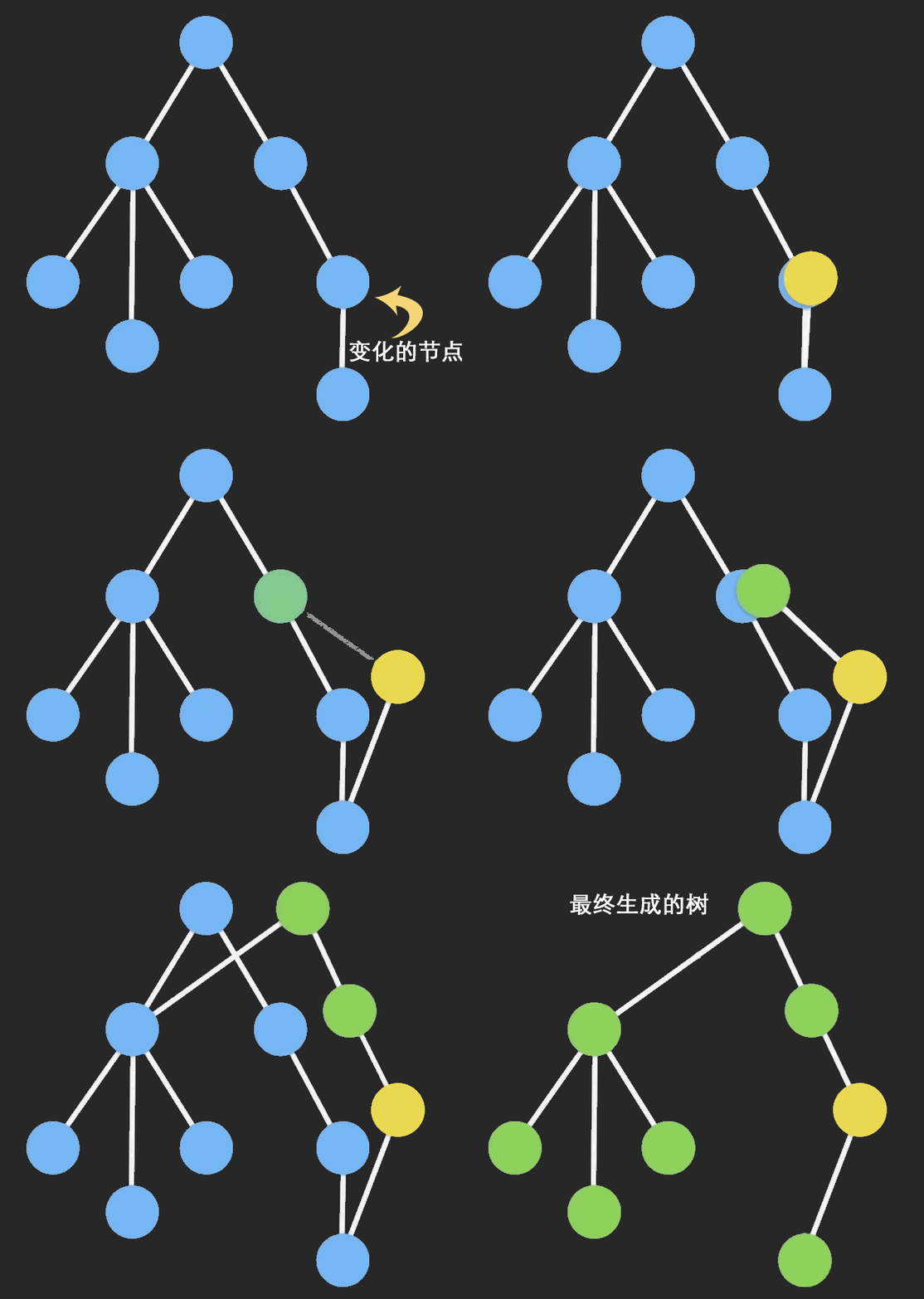
但是这样还是不够优雅,如果初始化的 state 是多层的对象,只是一层的深拷贝的 Object.assign 和展开运算符就失效了,如果直接使用深层次的 deepClone,在数据量大的时候又会有性能问题,这时候 immutable 对象就排上用场了,immutable 声明的数据被视为不可变的,任何添加、删除、修改操作都会生成一个新的对象,这时候小伙伴又有疑问了,那这和深拷贝有什么区别呢,immutable 实现的原理是持久化数据结构共享,即如果对象树中一个节点发生变化,只修改这个节点和受它影响的父节点,其它节点则进行共享,看下面的动图就方便理解 immutable 对象了
immutable 通过 set 和 get 来进行赋值和取值操作,immutable 的具体语法小伙伴请自行查阅[资料]哦(https://www.npmjs.com/package/immutable), 那我们来看看如何在 redux 中使用不可变对象吧,先来看一下不使用 combineReducer 的情况。
// ./src/index4.jsx
import { createStore } from 'redux'
import { fromJS } from 'immutable'
const initState = {
  num: 0,
}
// 使用formJS来将js对象转换为immutable对象
function counter(state = fromJS(initState), action) {
  switch (action.type) {
    case 'INCREMENT':
      return state.set('num', state.get('num') + 1)
    default:
      return state
  }
}
const store = createStore(counter)
store.dispatch({ type: 'INCREMENT' })
const a = store.getState().get('num')
store.dispatch({ type: 'INCREMENT' })
const b = store.getState().get('num')
console.log(a, 'a') // 1
console.log(b, 'b') // 2
3.2、redux-immutable 的使用和解析
可以看到我们实现了预期的效果,但是,如果我们要使用 combineReducer 就会出现问题,redux 提供的 combineReducer 方法我们上面也阅读过了,只能处理 js 对象,如果把 immutable 对象与 redux 提供的 combineReducer 一起使用,就会出现外层是 js 对象,内层是 immutable 对象的情况,这显然不是我们想要的,由于很多开发者采用了 Immutable.js,所以也有很多类似的辅助工具,例如 redux-immutable。这个第三方包实现了一个能够处理 Immutable Map 数据而非普通的 JavaScript 对象的 combineReducers
// ./src/index5.jsx
import { createStore } from 'redux'
import { fromJS } from 'immutable'
import { combineReducers } from 'redux-immutable'
const count = {
  num: 0,
}
const count2 = {
  num2: 0,
}
// 使用formJS来将js对象转换为immutable对象
function counter(state = fromJS(count), action) {
  switch (action.type) {
    case 'INCREMENT':
      return state.set('num', state.get('num') + 1)
    default:
      return state
  }
}
function counter2(state = fromJS(count2), action) {
  switch (action.type) {
    case 'INCREMENT2':
      return state.set('num2', state.get('num2') + 1)
    default:
      return state
  }
}
const rootReducer = combineReducers({
  counter,
  counter2,
})
const store = createStore(rootReducer)
store.dispatch({ type: 'INCREMENT' })
const a = store.getState().getIn(['counter', 'num'])
store.dispatch({ type: 'INCREMENT' })
const b = store.getState().getIn(['counter', 'num'])
store.dispatch({ type: 'INCREMENT2' })
const c = store.getState().getIn(['counter2', 'num2'])
store.dispatch({ type: 'INCREMENT2' })
const d = store.getState().getIn(['counter2', 'num2'])
console.log(a, 'a') // 1
console.log(b, 'b') // 2
console.log(c, 'c') // 1
console.log(d, 'd') // 2
通过 redux-immutable 我们又可以得到一个完整的 immutable 对象了,那 redux-immutable 和 redux 提供的 combineReducer 有什么区别呢,让我们来看一下 redux-immutable 的 combineReducer源码
import Immutable from 'immutable'
import { getUnexpectedInvocationParameterMessage, validateNextState } from './utilities'
/**
 * @params reducers 我们传入的reducer
 * @params getDefaultState 比redux combineReducer多了一个默认状态的参数,但是通常我们也不使用他
 */
export default (reducers: Object, getDefaultState: ?Function = Immutable.Map): Function => {
  const reducerKeys = Object.keys(reducers)
  return (inputState: ?Function = getDefaultState(), action: Object): Immutable.Map => {
    // 与之前的一样,在开发环境下会做一些类型校验
    if (process.env.NODE_ENV !== 'production') {
      const warningMessage = getUnexpectedInvocationParameterMessage(inputState, reducers, action)
      if (warningMessage) {
        // eslint-disable-next-line no-console
        console.error(warningMessage)
      }
    }
    //withMutations 主要用来提升性能,将需要多次创建的Imutable合并成一次。主要使用在需要对imutable 需要进行多次中间操作,最终返回一个Imutable的情况下
    return inputState.withMutations((temporaryState) => {
      // 这块就和redux combineReducer基本一样了,只不过把对js对象的操作方法转换为了immutable的api
      reducerKeys.forEach((reducerName) => {
        const reducer = reducers[reducerName]
        const currentDomainState = temporaryState.get(reducerName)
        const nextDomainState = reducer(currentDomainState, action)
        validateNextState(nextDomainState, reducerName, action)
        /**
             * validateNextState这个函数的作用也就是一个类型校验
              export default (nextState, reducerName: string, action: Object): void => {
                if (nextState === undefined) {
                  throw new Error('Reducer "' + reducerName + '" returned undefined when handling "' + action.type + '" action. To ignore an action, you must explicitly return the previous state.');
                }
              };
            */
        temporaryState.set(reducerName, nextDomainState)
      })
    })
  }
}
在理解了 redux combineReducer 的源码以后再来看 redux-immutable 其实很好理解了,主流程与 redux combineReducer 一致,只不过是把对 js 对象的操作方法转换为了 immutable 的 api。
4、bindActionCreators 用法及其解析
看到这里有的小伙伴会问,为什么上面的例子里派发 action 都是用的 store.dispatch,而在实际应用的时候好像很少这样写,通常都是以函数的形式来派发 action 呢?这就是 bindActionCreators 的功劳了,bindActionCreators 会对每个 action creator 进行包装,以便可以直接调用它们,那我们通过例子 🌰 来看一下 bindActionCreators 如何使用
//   ./src/index6.jsx
import { createStore, bindActionCreators } from 'redux'
const initState = {
  num1: 0,
  num2: 0,
  num3: 0,
  num4: 0,
}
function counter(state = initState, action) {
  switch (action.type) {
    case 'ADD_NUM1':
      return { ...state, num1: state.num1 + 1 }
    case 'ADD_NUM2':
      return { ...state, num2: state.num2 + 1 }
    case 'ADD_NUM3':
      return { ...state, num3: state.num3 + 1 }
    case 'ADD_NUM4':
      return { ...state, num4: state.num4 + 1 }
    default:
      return state
  }
}
const store = createStore(counter)
// 声明了四个的action creator,返回值就是要派发的action
const ADD_NUM1 = () => {
  return {
    type: 'ADD_NUM1',
  }
}
const ADD_NUM2 = () => {
  return {
    type: 'ADD_NUM2',
  }
}
const ADD_NUM3 = () => {
  return {
    type: 'ADD_NUM3',
  }
}
const ADD_NUM4 = () => {
  return {
    type: 'ADD_NUM4',
  }
}
/**
 * bindActionCreators(actionCreators, dispatch)
 * 这个方法接受两个参数
 * actionCreators: 一个 action creator,或者一个 value 是 action creator 的对象。
 * dispatch: 一个由 Store 实例提供的 dispatch 函数。
 */
const boundActionCreators = bindActionCreators(
  {
    ADD_NUM1,
    ADD_NUM2,
    ADD_NUM3,
    ADD_NUM4,
  },
  store.dispatch
)
console.log(boundActionCreators)
// 这样就可以通过下面的方式调用了
boundActionCreators.ADD_NUM1()
boundActionCreators.ADD_NUM2()
boundActionCreators.ADD_NUM3()
boundActionCreators.ADD_NUM4()
console.log(store.getState())
注:唯一会使用到 bindActionCreators 的场景是当你需要把 action creator 往下传到一个组件上,却不想让这个组件觉察到 Redux 的存在,而且不希望把 dispatch 或 Redux store 传给它。当然你也可以在任何场景下使用。:) ,那接下来让我们看一下 bindActionCreators 是怎样帮我们做到派发 action 的.
/**
 * actionCreators: 一个 action creator,或者一个 value 是 action creator 的对象。
 * dispatch: 一个由 Store 实例提供的 dispatch 函数。
 */
export default function bindActionCreators(actionCreators, dispatch) {
  // 如果我们只传入了一个action creator,返回bindActionCreator这个函数的返回值(这个函数我把他放在了下面)
  if (typeof actionCreators === 'function') {
    return bindActionCreator(actionCreators, dispatch)
  }
  // 国际惯例
  if (typeof actionCreators !== 'object' || actionCreators === null) {
    throw new Error(
      `bindActionCreators expected an object or a function, instead received ${
        actionCreators === null ? 'null' : typeof actionCreators
      }. ` +
        `Did you write "import ActionCreators from" instead of "import * as ActionCreators from"?`
    )
  }
  // 如果我们传入actionCreators的是一个action creator 的对象,那么就循环遍历这个对象,然后把每一个元素都转换成bindActionCreator
  const boundActionCreators = {}
  for (const key in actionCreators) {
    const actionCreator = actionCreators[key]
    if (typeof actionCreator === 'function') {
      boundActionCreators[key] = bindActionCreator(actionCreator, dispatch)
    }
  }
  return boundActionCreators
}
/**
 * 如果bindActionCreators第一个参数只传入了一个 action creator,将会返回下面这个函数
 * actionCreator: 传入的 action creator
 * dispatch: store.dispatch
 */
function bindActionCreator(actionCreator, dispatch) {
  // 这个其实很好理解,dispatch就是store.dispatch
  // actionCreator.apply(this, arguments)这个其实就是调用了我们声明的action creator,返回值也就是 {type: xxxxx}
  // 这样就实现了只要我们调用ADD_NUM就相当于执行了store.dispatch({type:xxxxx})
  return function () {
    return dispatch(actionCreator.apply(this, arguments))
  }
}
bindActionCreators 很巧妙的将 dispatch({type:xxx})的格式转换成了我们熟悉的函数的形式,并且如果应用在 react 中时,我们可以直接把这个函数传到子组件,这样子组件并不会感知到 redux
5、applyMiddleware 的使用和解析
在讲中间件之前我们先看一下 redux 提供给我们的一个工具函数 compose
export default function compose(...funcs) {
  if (funcs.length === 0) {
    return (arg) => arg
  }
  if (funcs.length === 1) {
    return funcs[0]
  }
  return funcs.reduce(
    (a, b) =>
      (...args) =>
        a(b(...args))
  )
}
这个函数有什么作用呢,让我们执行以下看看
//   ./src/index7.jsx
function compose(...funcs) {
  if (funcs.length === 0) {
    return (arg) => arg
  }
  if (funcs.length === 1) {
    return funcs[0]
  }
  return funcs.reduce(
    (a, b) =>
      (...args) =>
        a(b(...args))
  )
}
function func1(arg) {
  return arg + 1
}
function func2(arg) {
  return arg + 1
}
function func3(arg) {
  return arg + 1
}
const res = func1(func2(func3(1)))
console.log(res, 'res') // 4
const composeFun = compose(func1, func2, func3)
const res2 = composeFun(1)
console.log(res2, 'res2') // 4
可以看到我们将 func1(func2(func3(1)))这种格式转换成了 compose(func1, func2, func3)(1),这种写法有两个优点。
- 1、就是防止函数左边化,使代码更加清晰
- 2、如果我们不知道有多少个函数嵌套调用的时候,使用 compose 就比较方便了,例如我们在使用 redux 时可能会传入多个中间件函数,compose 可以把所有的中间件当做参数传入,就可以实现中间件的嵌套使用了
在介绍 applyMiddleware 之前,我们需要了解一下中间件的心智模型,redux 官网中间件篇将带领我们一步一步的理解 Middleware,他会带领你从简单的函数封装到编写一个简单的中间件,我相信当你耐心看完这边文章以后一定会对中间件有了更加深刻的理解,这时我们就可以来看一下 applyMiddleware 是怎样实现的了。
注:这篇文章写得特别好,没有看过这篇文章的小伙伴一定要多琢磨几遍,这里再推荐一下 Dan Abramov 的个人博客,每一篇都是满满的干货(而且大部分篇章都有中文翻译),其中useEffect 完整指南完整的讲述了函数式组件的心智模型,推荐大家阅读一下
在讲 applyMiddleware 之前我们先看一下 applyMiddleware 是如何使用的
//    ./src/index8.jsx
import { createStore, applyMiddleware } from 'redux'
/**
 * 记录所有被发起的 action 以及产生的新的 state。的中间件
 * 相信大家在读完redux官网的文章以后肯定可以理解下面这个中间件函数
 */
const logger = (store) => (next) => (action) => {
  console.group(action.type)
  console.info('dispatching', action)
  let result = next(action)
  console.log('next state', store.getState())
  console.groupEnd(action.type)
  return result
}
const initState = {
  num: 0,
}
function counter(state = initState, action) {
  switch (action.type) {
    case 'ADD_NUM1':
      return { ...state, num: state.num + 1 }
    default:
      return state
  }
}
const store = createStore(counter, applyMiddleware(logger))
store.dispatch({ type: 'ADD_NUM1' })
store.dispatch({ type: 'ADD_NUM1' })
我们可以看到 applyMiddleware(logger)是当做第参数传入到 createStore 里的,所以我们回顾一下 createStore
  createStore(reducer, preloadedState, enhancer) {
    ...
    ...
    if (typeof enhancer !== 'undefined') {
      if (typeof enhancer !== 'function') {
        throw new Error('Expected the enhancer to be a function.')
      }
      // 关键在这里
      return enhancer(createStore)(reducer, preloadedState)
    }
    ...
    ...
  }
enhancer 就是我们传入 applyMiddleware(logger),所以接下来的思路就是看一下 applyMiddleware(logger)返回值,这个时候我们就要看一下 applyMiddleware 的源码是怎样实现的了
import compose from './compose'
/**
 * 接收的参数就是我们传入的中间件,并且使用解构运算将传入多个中间件转换为数组的形式
 */
export default function applyMiddleware(...middlewares) {
  // 返回值是一个三级的柯里化函数
  // 第一级函数调用就是enhancer(createStore),相当于把创建store的方法传给了applyMiddleware
  // 第二级函数调用就是enhancer(createStore)(reducer, preloadedState),将reducer, preloadedState传给applyMiddleware
  return (createStore) =>
    (...args) => {
      // ...args就是reducer, preloadedState,这里就相当于创建了一个store
      const store = createStore(...args)
      let dispatch = () => {
        throw new Error(
          'Dispatching while constructing your middleware is not allowed. ' +
            'Other middleware would not be applied to this dispatch.'
        )
      }
      // 这里就是文档里说的:它只暴露一个 store API 的子集给 middleware:dispatch(action) 和 getState()。
      const middlewareAPI = {
        getState: store.getState,
        dispatch: (...args) => dispatch(...args),
      }
      /**
       * 这是我们传入的中间件
        const logger = store => next => action => {
          console.group(action.type)
          console.info('dispatching', action)
          let result = next(action)
          console.log('next state', store.getState())
          console.groupEnd(action.type)
          return result
        }
      */
      const chain = middlewares.map((middleware) => middleware(middlewareAPI))
      /**
       * 经过上面的map遍历调用每一个中间件,得到的chain如下
       * chain = [
           next => action => {
            console.group(action.type)
            console.info('dispatching', action)
            let result = next(action)
            console.log('next state', middlewareAPI.getState()) // 这里发生了改变
            console.groupEnd(action.type)
            return result
          }
       * ]
      */
      dispatch = compose(...chain)(store.dispatch)
      /**
       * compose(...chain)的作用就是将我们传入的中间件嵌套调用,作用是保证每一个中间的的传入的next参数都是上一个中间件修改后的dispatch,由于我们这里只传入了一个中间件,compose(...chain)结果就是chain[0]
       * dispatch =
          action => {
            console.group(action.type)
            console.info('dispatching', action)
            let result = store.dispatch(action) // 这里发生了改变
            console.log('next state', middlewareAPI.getState())
            console.groupEnd(action.type)
            return result
          }
      */
      return {
        ...store,
        dispatch,
      }
      // 最后将改写后的dispatch返回
    }
}
applyMiddleware 的源码可谓是短小精悍,但是想要彻底理解他还需要反复琢磨
6、redux-thunk 的使用和解析
默认情况下,createStore() 所创建的 Redux store 没有使用 middleware,所以只支持 同步数据流。如果我们想要在 dispatch 的时候发起异步请求,就可以使用像 redux-thunk 或 redux-promise 这样支持异步的 middleware,我们先看下 redux-thunk 是如何使用
//    ./src/index9.jsx
import { createStore, applyMiddleware } from 'redux'
import thunk from 'redux-thunk'
const initState = {
  num: 0,
  data: null,
}
const logger = (store) => (next) => (action) => {
  console.group(action.type)
  console.info('dispatching', action)
  let result = next(action)
  console.log('next state', store.getState())
  console.groupEnd(action.type)
  return result
}
function counter(state = initState, action) {
  switch (action.type) {
    case 'ADD_NUM1':
      return { ...state, num: state.num + 1 }
    case 'FETCH_DATA':
      return { ...state, data: action.data }
    default:
      return state
  }
}
// 同时使用了thunk和logger两个中间件
const store = createStore(counter, applyMiddleware(thunk, logger))
// 异步请求数据的方法
const fetchData = () => {
  return new Promise((resolve, reject) => {
    setTimeout(() => {
      resolve('im asyncdata')
    }, 2000)
  })
}
// 这是我们要派发的action,使用了redux-thunk以后,action书写成一个函数,在函数里面dispatch action
const asyncData = () => {
  return (dispatch) => {
    fetchData().then((res) => {
      dispatch({
        type: 'FETCH_DATA',
        data: res,
      })
    })
  }
}
store.dispatch({ type: 'ADD_NUM1' })
store.dispatch(asyncData())
使用了 redux-thunk 以后,异步请求我们不再简单的 dispatch 一个对象,而是 dispatch 一个函数,为什么会发成这种变化呢,让我们来看一看 redux-thunk 内部究竟发生了什么
function createThunkMiddleware(extraArgument) {
  return ({ dispatch, getState }) =>
    (next) =>
    (action) => {
      if (typeof action === 'function') {
        return action(dispatch, getState, extraArgument)
      }
      return next(action)
    }
}
const thunk = createThunkMiddleware()
thunk.withExtraArgument = createThunkMiddleware
export default thunk
熟悉了中间件以后,其实再阅读中间件就变得很容易了,上述代码中,真正实现 redux-thunk 的功能的代码就以下这个函数
;(action) => {
  if (typeof action === 'function') {
    return action(dispatch, getState, extraArgument)
  }
  return next(action)
}
如果 dispatch 的是一个对象,那么还是原来的 dispatch,如果 dispatch 的是一个函数,那我们就执行这个函数,再回顾一下我们写的 asyncData 这个函数,执行他的返回值的结果就是在两秒后 dispatch 一个普通的 action,就是这么简单的实现了异步数据流,其实看到这里我们也会发现,如果不引入 redux-thunk 我们也可以自己手动调用 asyncData()(store.dispatch)来发起异步请求,只是 redux-thunk 帮我们优雅的做了处理,并且通过 redux-thunk 处理,还可以完美的兼容 bindActionCreators
//    ./src/index10.jsx
import { createStore, applyMiddleware, bindActionCreators } from 'redux'
import thunk from 'redux-thunk'
const initState = {
  num: 0,
  data: null,
}
const logger = (store) => (next) => (action) => {
  console.group(action.type)
  console.info('dispatching', action)
  let result = next(action)
  console.log('next state', store.getState())
  console.groupEnd(action.type)
  return result
}
function counter(state = initState, action) {
  switch (action.type) {
    case 'ADD_NUM1':
      return { ...state, num: state.num + 1 }
    case 'FETCH_DATA':
      return { ...state, data: action.data }
    default:
      return state
  }
}
// 同时使用了thunk和logger两个中间件
const store = createStore(counter, applyMiddleware(thunk, logger))
// 异步请求数据的方法
const fetchData = () => {
  return new Promise((resolve, reject) => {
    setTimeout(() => {
      resolve('im asyncdata')
    }, 2000)
  })
}
// 这是我们要派发的action,使用了redux-thunk以后,action书写成一个函数,在函数里面dispatch action
const asyncData = () => {
  return (dispatch) => {
    fetchData().then((res) => {
      dispatch({
        type: 'FETCH_DATA',
        data: res,
      })
    })
  }
}
const addNum1 = () => {
  return {
    type: 'ADD_NUM1',
  }
}
const boundActionCreators = bindActionCreators(
  {
    asyncData,
    addNum1,
  },
  store.dispatch
)
console.log(boundActionCreators, 'boundActionCreators')
boundActionCreators.asyncData()
boundActionCreators.addNum1()
到这里,整个 redux 的源码解析也就完成了。