

Babel 浅谈
11月 01, 2021 • ☕️☕️☕️ 30 min read
Babel 作为前端工程化体系中不可缺少的一环,“存在感”却是很低的。在平常的业务开发中,往往不会被人直接用到。大部分的开发者都可以准确的说出 Babel 的作用,以及他的工作流程(parse -> transform -> generate)。但是具体每个环节都做了哪些事情,实现的原理可能就没办法很清楚讲出来,今天我们就由浅入深的讲解一下 Babel 到底是怎样偷偷的“改变”的你的代码。
首先我们要知道,Babel 是一个 JavaScript 编译器,更确切地说是源码到源码的转译器,主要用于在当前和旧浏览器环境中将 ECMAScript 2015+ 代码转换为向后兼容的 JavaScript 版本。以下是 Babel 可以为你做的主要事情:
- 转换语法
- 对目标环境中缺少的能力提供 Polyfill 功能
- 源代码转换
例如以下代码所示:
// Babel Input: ES2015 arrow function
const res = [1, 2, 3].map((n) => n + 1)

// Babel Output: ES5 equivalent
var res = [1, 2, 3].map(function (n) {
  return n + 1
})
简单的来说,Babel 就是先将你的源代码 parse 成 AST,然后对 AST 进行一定规则的修改生成新的 AST,最后根据新的 AST 生成转译后的代码。那我们先来讲一下什么是 AST,以及 AST 中一些常见的节点类型。
首先 AST 也叫抽象语法树,他是对源代码的抽象的树状表示。树的每个节点表示源代码中出现的结构。之所以被称为抽象,是因为它并不会代表真实代码中出现的所有细节,例如 {} 这种,他的结构本身就可以被树状结构所表示。那 Babel AST 都有哪些常见的节点类型呢。
我们可以借助 astexplorer 来更清晰的观察 AST
- Literal
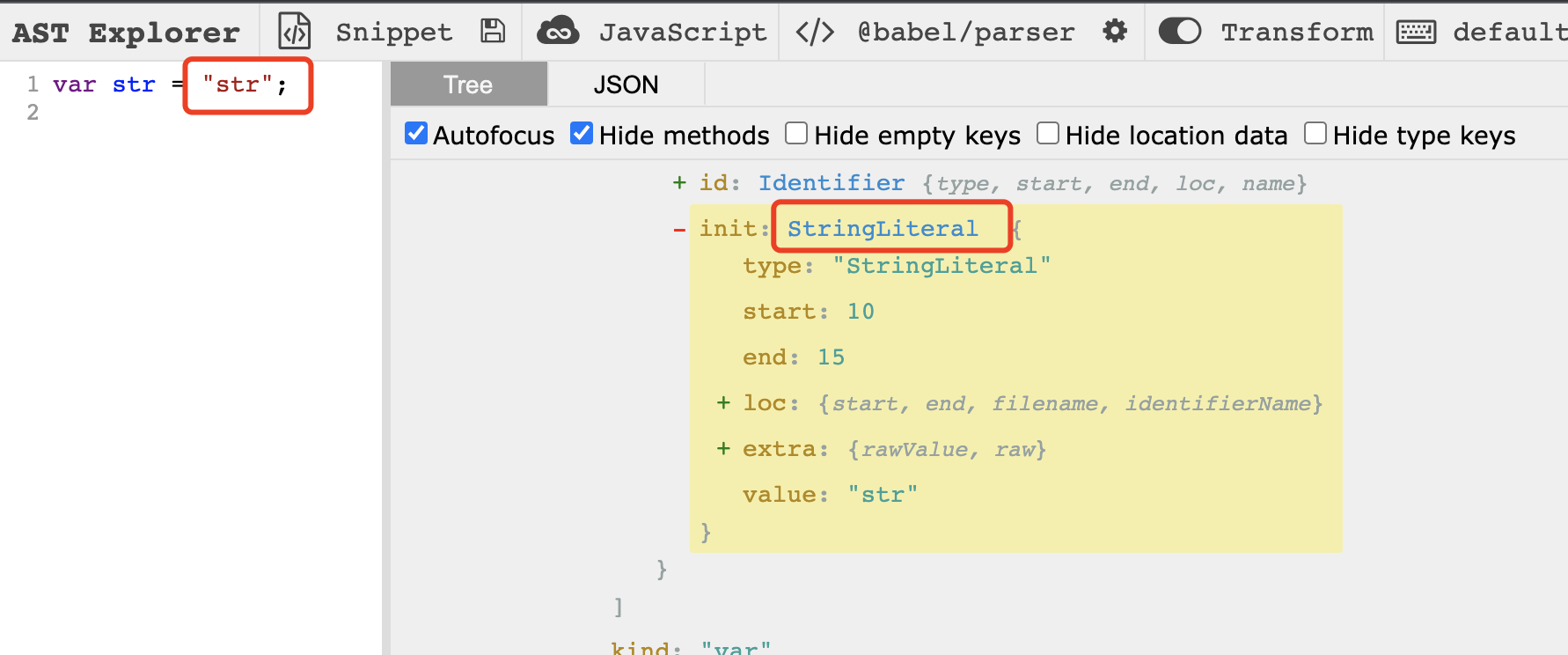
Literal 是字面量的意思,例如我声明了一个字符串,那他的类型就是 StringLiteral。
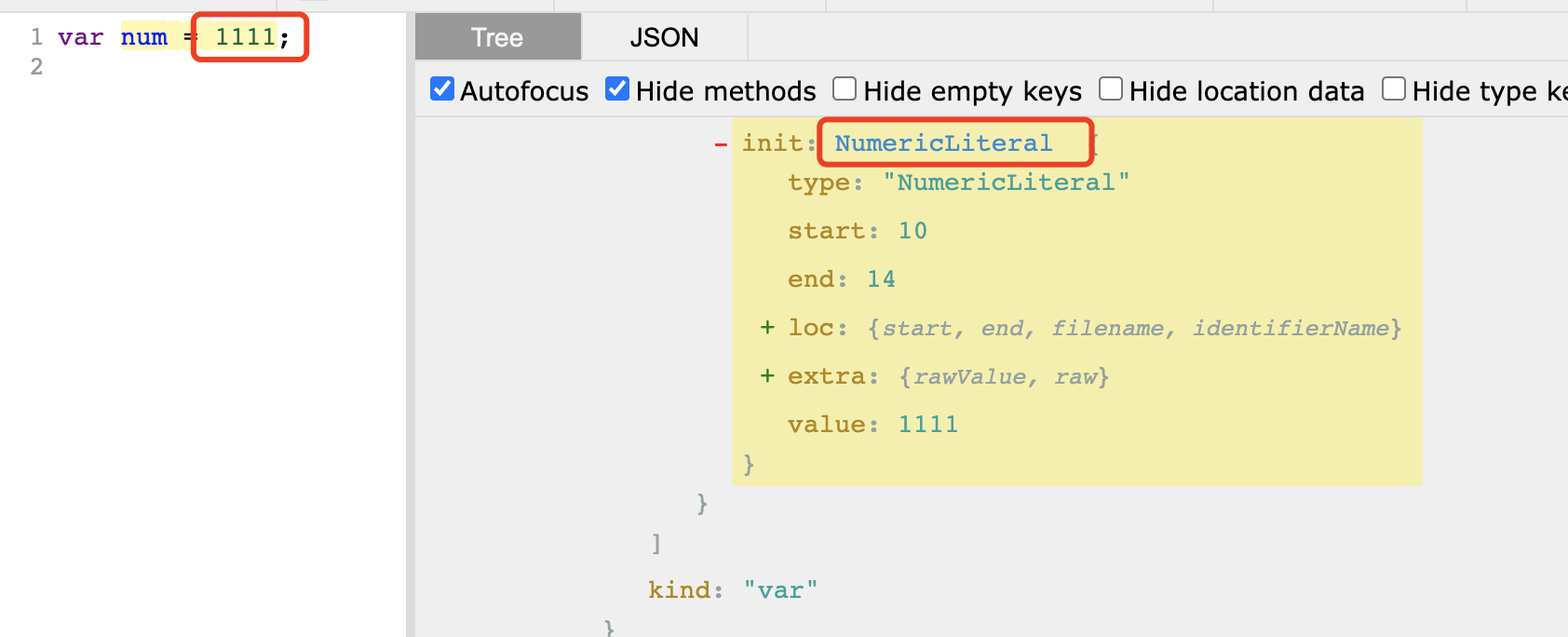
如果我声明的是一个 number,那他的类型就是 NumericLiteral。
- Identifier
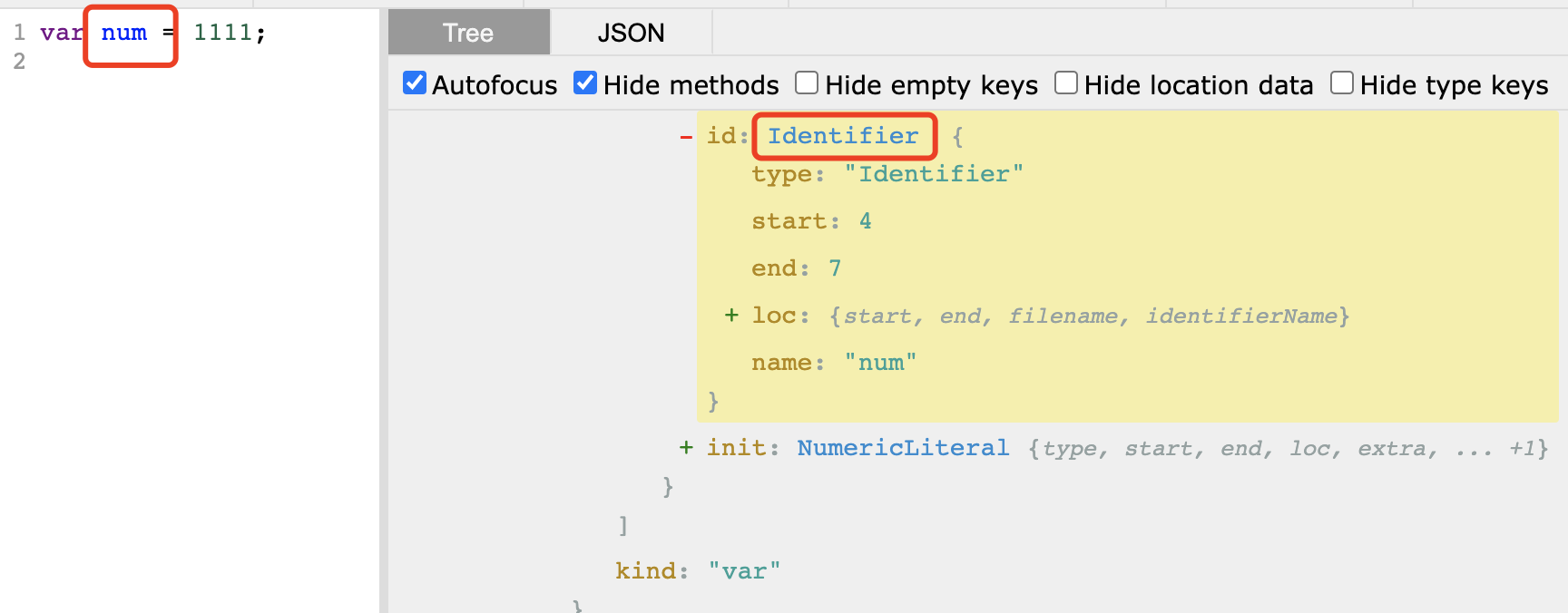
Identifier 指的就是 js 中的变量,例如变量名,函数名这些都是 Identifier。
- Statement
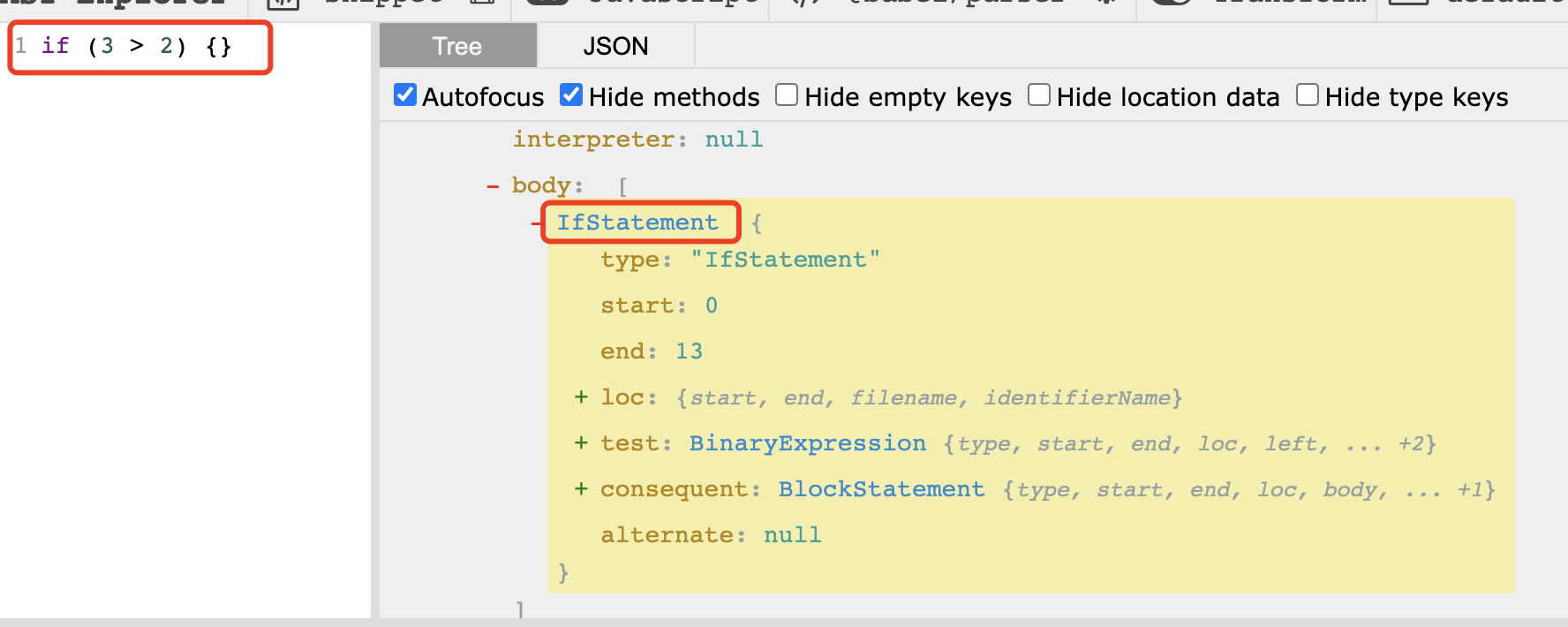
Statement 指的是语句,比如我们写的 if 语句,for 语句,while 语句等。
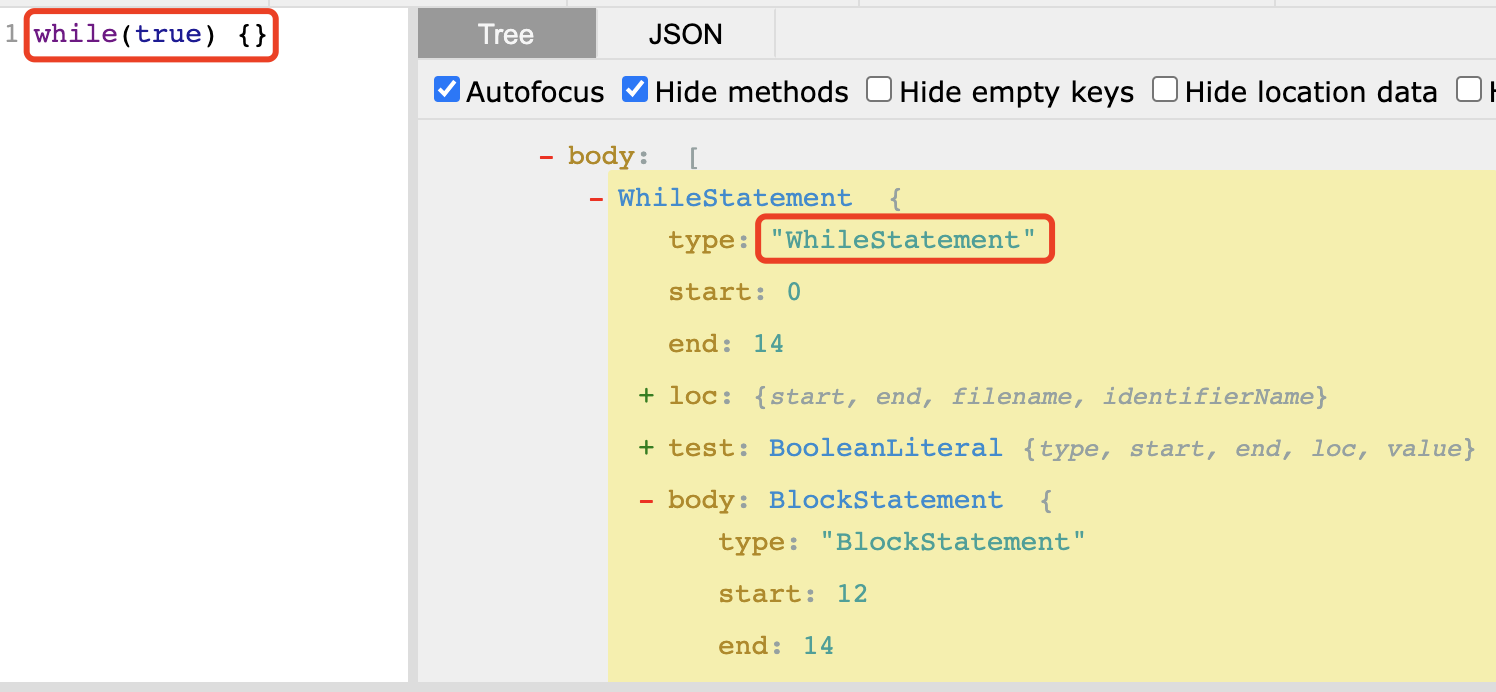
- Expression
Expression 是表达式,例如赋值表达式,比较表达式等
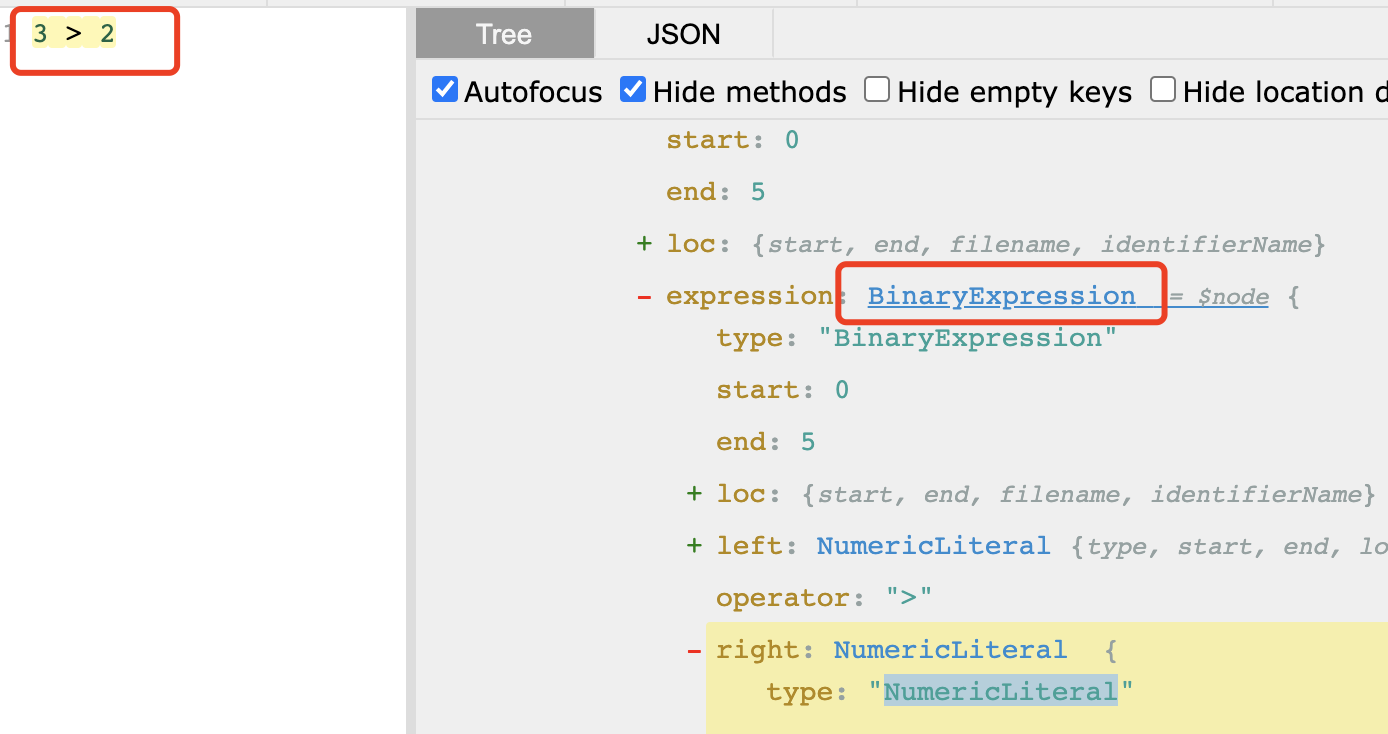
Babel parse 的 AST 还有很多节点类型,想详细了解可以通过查阅文档。
在了解了什么是 AST,以及 Babel 的 AST 有哪些常见的节点类型以后,我们再来看下究竟是 Babel 中的哪个模块来帮你实现了由源码到 AST 的转换。
@babel/parser,之前也被称作 Babylon,他的主要作用就是将源代码转换为 AST。并且支持以下四种能力。
- 默认启用最新的 ECMAScript 版本(ES2020)。
- 注释。
- 支持 JSX、Flow、Typescript。
- 支持实验性语言提案(接受任何至少 stage-0 的 PR )。
@babel/parser 是基于 acorn 的扩展,那什么又是 acorn ?说到这里我们就要再赘述一下 AST 的发展史。最早的 AST 是由 SpiderMonkey 开源的 estree 标准,然后基于 estree 又衍生出了 esprima 和 acorn 两种,由于 acorn 的可扩展性,后续 Eslint(espree) 的 parse 和 Babel(Babel parse) 的 parse 都选择了基于 acorn 来进行扩展,而 typescript 和 webpack 的 parse 则是另外一套标准。

@babel/parser 的 使用如下所示,第一个参数是要转义的源代码,第二个参数是 options,支持传入一些插件,例如可以使用解析 jsx 和 flow 的插件。
require('@babel/parser').parse('code', {
  // parse in strict mode and allow module declarations
  sourceType: 'module',

  plugins: [
    // enable jsx and flow syntax
    'jsx',
    'flow',
  ],
})
在 @babel/parser 生成 AST 以后,就需要另一个模块来对 AST 进行操作,这个模块就是 @babel/traverse。
@babel/traverse 提供了 visitor 函数对遍历到的 AST 进行处理(对 AST 的遍历是深度优先),visitor 提供了 path 的 api 来对 AST 节点进行筛选和操作。在 traverse 的时候,我们又可以通过另一个模块 @babel/types,来检查和构建 AST。
最后我们可以再通过 @babel/generator 模块将 AST 输出为转换后的源代码,整个操作我们可以用以下代码表示。
const parser = require('@babel/parser')
const traverse = require('@babel/traverse').default
const types = require('@babel/types')
const generator = require('@babel/generator').default

/**
 * 定义我们的源代码
 * */
const sourceCode = `var a = 1`

/**
 * 通过 parse 模块来生成 ast 语法树
 */
const ast = parser.parse(sourceCode)

/**
 * 通过 traverse 模块来对 ast 进行遍历和修改
 */
traverse(ast, {
  // 对 VariableDeclarator 类型的 AST 进行处理
  VariableDeclarator(path) {
    // 判断表达式右侧的节点是否是 NumericLiteral 类型,如果是的话将其加1
    if (types.isNumericLiteral(path.node.init)) {
      path.node.init.value = path.node.init.value + 1
    }
  },
})

const { code } = generator(ast)
console.log('code: ', code) // var a = 2
除了这几个核心的模块。Babel 还提供了 @babel/code-frame (用于输出错误警告),@babel/template (用于批量创建 AST),@babel/core (对以上几个模块的聚合)。
有了以上的了解以后,我们就可以尝试开发一个 Babel 的插件。首先我们先来实现一个老生常谈的例子,在调用 console 的地方,打印其行列信息。
// 输入
console.log(1)

function foo() {
  console.log('foo')
}

// 输出
console.log(`line:1, column:1`, 1)

function foo() {
  console.log(`line:4, column:2`, 'foo')
}
首先我们可以先通过 astexplorer 来观察我们输入的源码的 AST 语法树
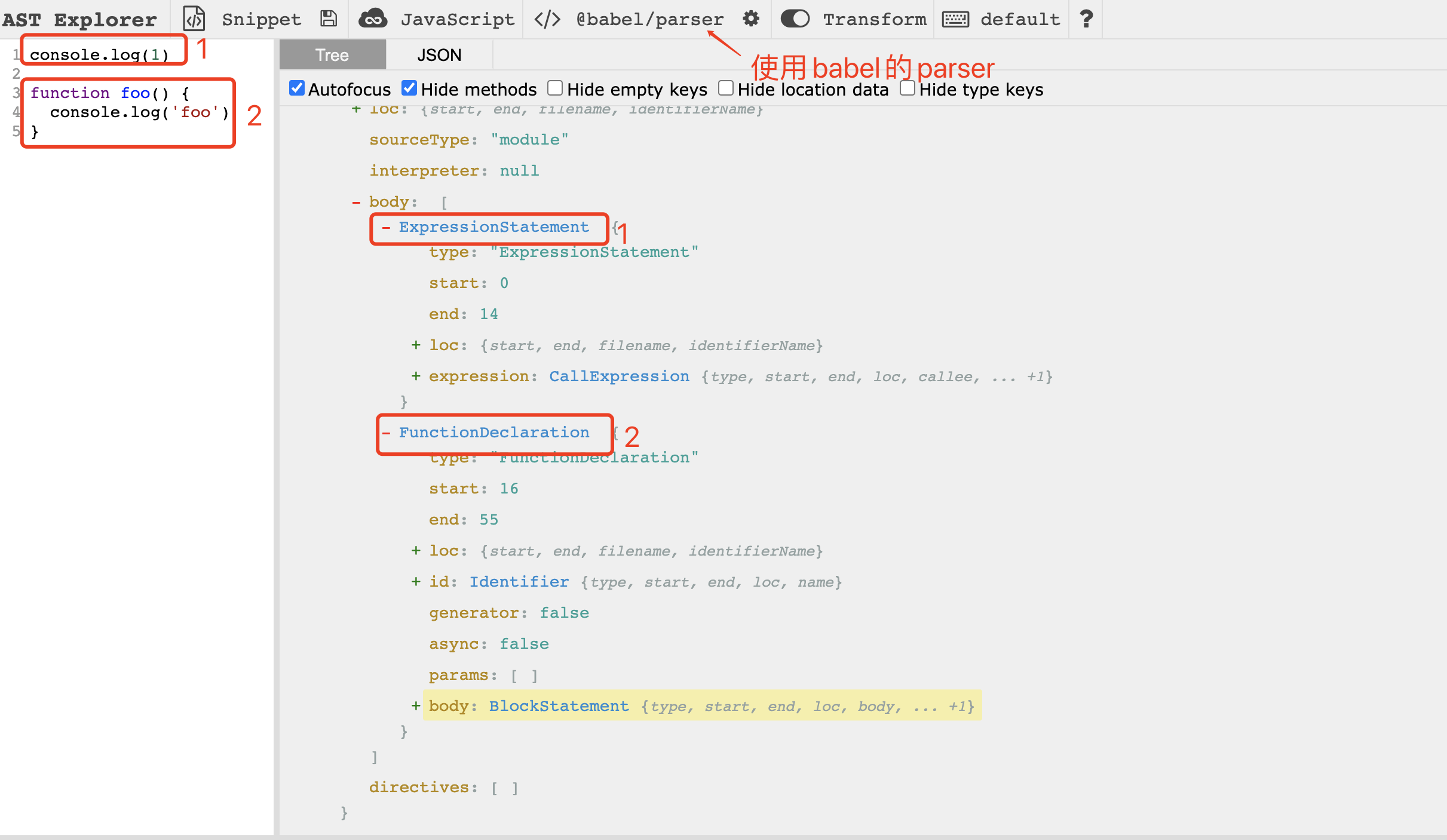
在观察以后,我们开始实现一下。首先引入我们需要的模块。
const sourceCode = `
  console.log(1)

  function foo() {
    console.log('foo')
  }
`

const parser = require('@babel/parser')
const traverse = require('@babel/traverse').default
const types = require('@babel/types')
const generator = require('@babel/generator').default
然后将我们输入的源码转换为 AST
const sourceCode = `
  console.log(1)

  function foo() {
    console.log('foo')
  }
`

const parser = require('@babel/parser')
const traverse = require('@babel/traverse').default
const types = require('@babel/types')
const generator = require('@babel/generator').default

const ast = parser.parse(sourceCode)
核心部分来了,接下来对 AST 进行处理
const sourceCode = `
  console.log(1)

  function foo() {
    console.log('foo')
  }
`

const parser = require('@babel/parser')
const traverse = require('@babel/traverse').default
const types = require('@babel/types')
const generator = require('@babel/generator').default

const ast = parser.parse(sourceCode)

traverse(ast, {
  // console.log 属于 CallExpression 类型
  CallExpression(path) {
    /**
     * 首先判断 path.node.callee 是不是 MemberExpression
     * 然后判断是否是console打头,"log", "info", "error" 结尾
     * 符合这些条件我们就可以对()里的内容进行修改
     */
    if (
      types.isMemberExpression(path.node.callee) &&
      path.node.callee.object.name === 'console' &&
      ['log', 'info', 'error'].includes(path.node.callee.property.name)
    ) {
      const { line, column } = path.node.loc.start
      path.node.arguments.unshift(
        /**
         * https://babeljs.io/docs/en/babel-types
         * 通过调用 types 的 stringLiteral api 来创建一个 stringLiteral 类型的 ast
         * */
        types.stringLiteral(`line:${line}, column:${column}`)
      )
    }
  },
})

const { code } = generator(ast)
console.log(code)
最后查看控制台数据结果,已经达到我们预期的输出
console.log('line:2, column:0}', 1)

function foo() {
  console.log('line:5, column:2}', 'foo')
}
然后我们只需要将上述的实例改写为符合 Babel 插件格式的语法即可,首先介绍下 Babel 插件的格式,Babel 插件是一个函数,函数的参数就是 types 模块,返回值是一个对象,对象中的 visitor 属性就是 traverse 的 visitor 方法。
module.export = function ({ types }) {
  return {
    visitor: {//...},
  }
}
将我们上述的写法改为 Babel 插件的写法,最终的效果就是:
module.export = function ({ types }) {
  return {
    visitor: {
      CallExpression(path) {
        if (
          types.isMemberExpression(path.node.callee) &&
          path.node.callee.object.name === 'console' &&
          ['log', 'info', 'error'].includes(path.node.callee.property.name)
        ) {
          const { line, column } = path.node.loc.start
          path.node.arguments.unshift(types.stringLiteral(`line:${line}, column:${column}`))
        }
      },
    },
  }
}
最后我们用astexplorer来验证下。
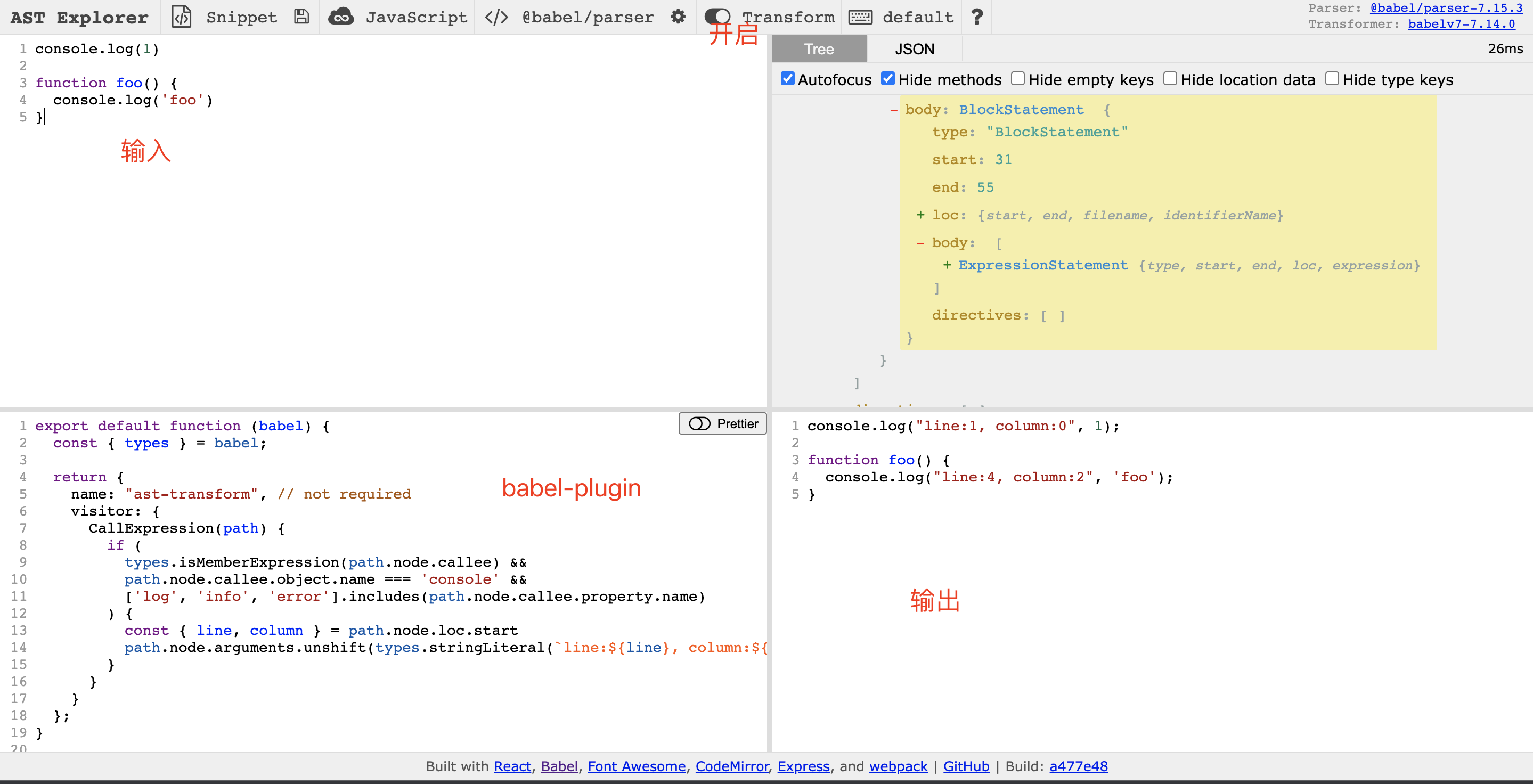
在验证没有问题后,我们就可以将这个插件发包,然后在项目里通过 Bable plugin 的形式引用。或者直接将插件卸载项目里,然后通过相对路径的形式引用也是可以的。
在实现了上述一个简单的小例子后,我们再来实现一个骚一点的操作。在 react 中,我们经常会遇到根据一个 state 来动态展示一个组件的场景。
import React, { FC, useState } from 'react'

const App: FC = (props) => {
  const [visible, setVisible] = useState<Boolean>(false)

  const handleClick = () => setVisible((prev) => !prev)

  return (
    <div>
      {visible ? <CustomCom /> : null}
      <button onClick={handleClick}>点击</button>
    </div>
  )
}
而在 vue 中,我们只需要使用 v-if 这个条件属性即可实现同样的效果,那我们可不可以在 react 中也是用类似的写法呢,例如上述例子可以改造为:
import React, { FC, useState } from 'react'

const App: FC = (props) => {
  const [visible, setVisible] = useState<Boolean>(false)

  const handleClick = () => setVisible((prev) => !prev)

  return (
    <div>
      <CustomCom x-if={visible} />
      <button onClick={handleClick}>点击</button>
    </div>
  )
}
这样看起来是不是更简洁一点呢,这个时候其实就可以用到我们刚刚讲过的 Babel 插件的形式来实现,在 AST 中取出 x-if 等号右边的值,然后拼接回来原本 xxx && xxx 的写法。
module.exports = function ({ types: t }) {
  return {
    visitor: {
      // 首先我们要处理的节点类型是 JSXElement
      JSXElement(path) {
        const { node } = path
        // 查看开标签的属性中是否有 x-if 的属性
        const xIfAttr = node.openingElement.attributes.find((item) => {
          return item.type === 'JSXAttribute' && item.name.name === 'x-if'
        })
        if (!xIfAttr) return
        // 如果有的话创建一个新的开标签,继承之前标签的除x-if的所有属性
        const openElement = t.jSXOpeningElement(
          node.openingElement.name,
          node.openingElement.attributes.filter((item) => {
            return item.name.name !== 'x-if'
          }),
          node.openingElement.selfClosing
        )
        // 使用新建的开标签 + 原有children + 原有闭标签创建一个新的JSXElement
        const Element = t.JSXElement(openElement, node.closingElement, node.children)
        // 生成一个三目表达式,判断条件就是 x-if 等号右边的值
        const expression = t.conditionalExpression(
          xIfAttr.value.expression,
          Element,
          t.nullLiteral()
        )
        path.replaceWith(expression)
      },
    },
  }
}
让我们来验证一下:
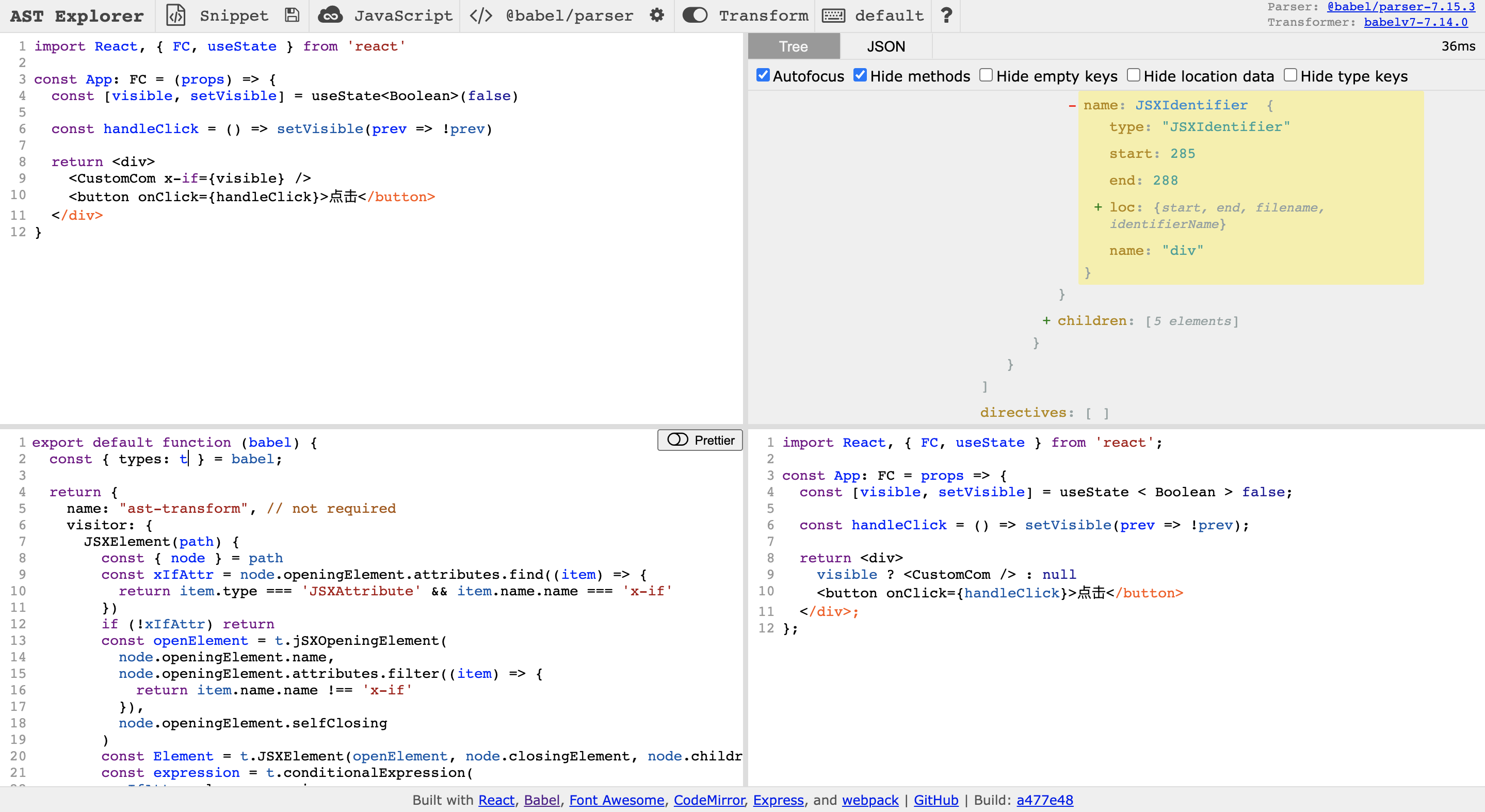
这下我们就可以在 react 中愉快的使用“模板语法了” (手动狗头,要投入生产环境的话还需要考虑很多 case)。这里我之前有发过一个 babel-plugin-x-if的 npm 包,感兴趣的可以拉下来在项目里试一下哦。
既然有了 x-if,那必然不能少了 x-for。然我们看下 x-for 的实现逻辑。
module.exports = function ({ types: t }) {
  return {
    visitor: {
      JSXElement(path) {
        const { node } = path
        const xForAttr = node.openingElement.attributes.find((item) => {
          return item.type === 'JSXAttribute' && item.name.name === 'x-for'
        })
        if (!xForAttr) return
        const xForExpression = xForAttr.value
        const judgeArrayMemberExpression = t.MemberExpression(
          t.identifier('Array'),
          t.identifier('isArray')
        )
        const judgeArrayCallExpression = t.callExpression(judgeArrayMemberExpression, [
          t.identifier(xForExpression.expression.right.name),
        ])
        const xForArrMethodMemberExpression = t.MemberExpression(
          t.identifier(xForExpression.expression.right.name),
          t.identifier('map')
        )
        const xForOpenElement = t.jSXOpeningElement(
          node.openingElement.name,
          node.openingElement.attributes.filter((item) => {
            return item.name.name !== 'x-for'
          })
        )
        const xForElement = t.JSXElement(xForOpenElement, node.closingElement, node.children, false)
        const xForReturnStatement = t.ReturnStatement(xForElement)
        // {}
        const xForInBlockStatement = t.BlockStatement([xForReturnStatement])
        // item => {
        //   return <li key={item}>{item}</li>;
        // }
        // 要兼容(item)=> 和 (item, index)=> 两种情况
        const xForArrowFunctionExpression = t.arrowFunctionExpression(
          xForExpression.expression.left.type === 'SequenceExpression'
            ? xForExpression.expression.left.expressions
            : [t.Identifier(xForExpression.expression.left.name)],
          xForInBlockStatement
        )
        // arr.map(item => {
        //   return <li key={item}>{item}</li>;
        // })
        const xForCallExpression = t.callExpression(xForArrMethodMemberExpression, [
          xForArrowFunctionExpression,
        ])
        // Array.isArray(arr)
        const xForLogicalExpression = t.LogicalExpression(
          '&&',
          judgeArrayCallExpression,
          xForCallExpression
        )
        // Array.isArray(arr) && arr.map((item, index) => {
        //   return <li key={index}>{item.label}</li>;
        // });
        const xForExpressionStatement = t.ExpressionStatement(xForLogicalExpression)
        // {
        //   Array.isArray(arr) && arr.map((item, index) => {
        //     return <li key={index}>{item.label}</li>;
        //   });
        // }
        const xForOutBlockStatement = t.blockStatement([xForExpressionStatement])
        path.replaceWith(xForOutBlockStatement)
      },
    },
  }
}
x-for 的实现会相对复杂些,且考虑的场景会更多,这里也只是抛砖引玉,给一个基本的实现思路,具体实现大家可以自行尝试一下。按照惯例我们测试一下。
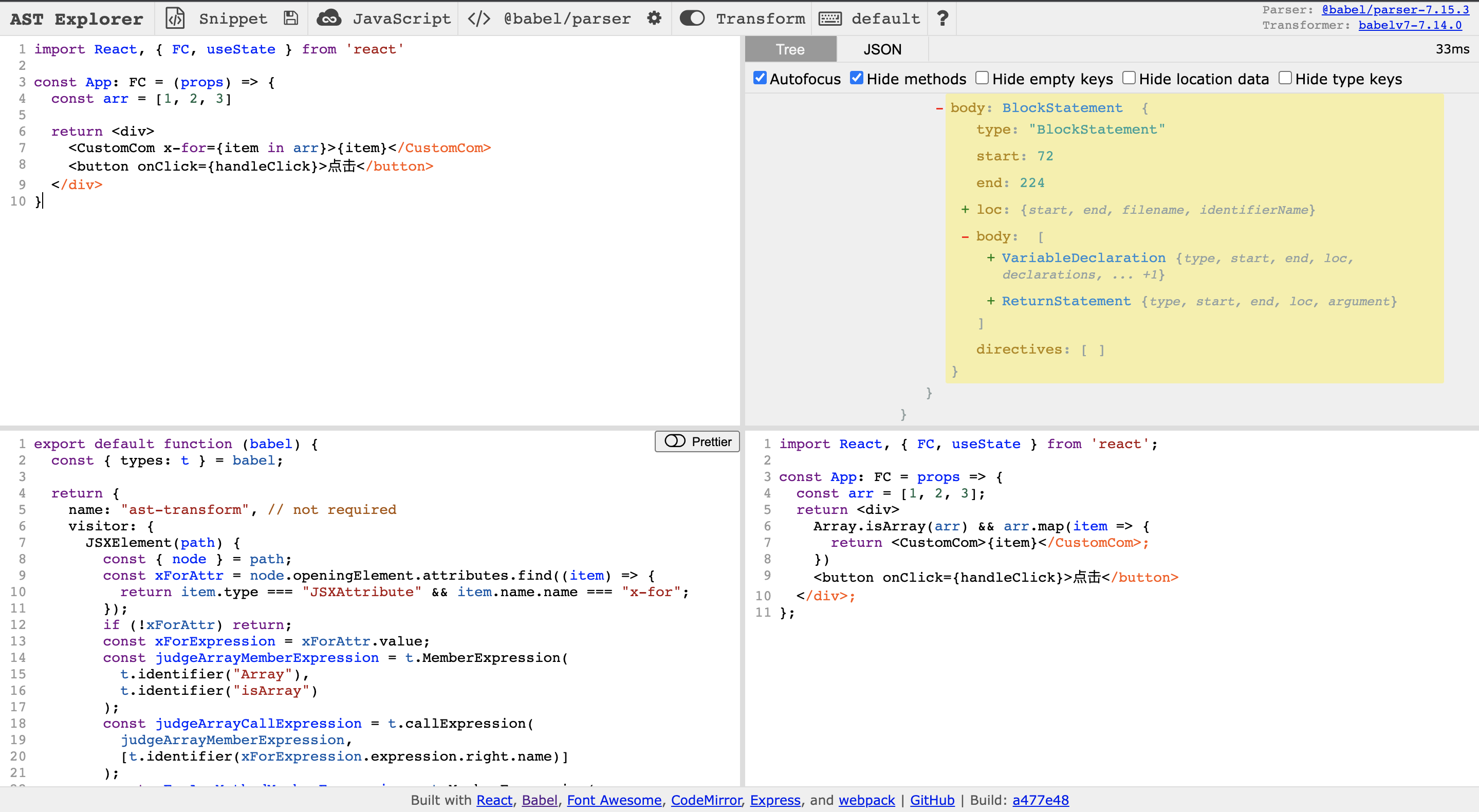
基本上实现了我们想要的效果,同样这个我也有发过一个 babel-plugin-x-for 的包,感兴趣也可以尝试一下。
通过以上几个例子,其实我们可以发散一下思路,在平时的业务开发中,是不是有靠业务层面比较难实现,但是通过编译维度进行降维打击却可以简单的实现呢。例如自动化埋点、自动生成 api 文档之类?但这些都是建立在我们对工程化体系有一个完整的了解的情况下才会想到。在这里我们只是简单的了解了一下 Babel 的用法。但是在整个前端工程化体系中,涉及到编译技术的除了 Babel,还有 eslint,typescript 等。仅仅对 Babel 的使用有一些了解是远远不够的。但是 Babel 是一个很好的切入点。
参考
https://babeljs.io/docs/en/
https://github.com/brigand/babel-plugin-handbook/blob/master/translations/zh-Hans/README.md
https://live.juejin.cn/4354/4815025